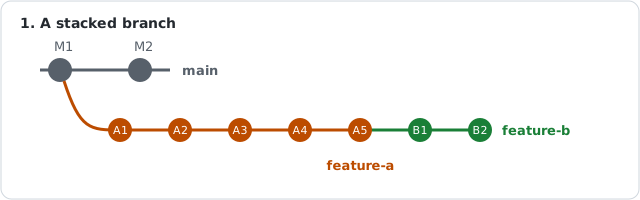
A situation that happens a lot in teams: a teammate opens feature-a, you need their work, so you branch feature-b off it and keep going. A few days later feature-a gets merged into main. Now you want feature-b to sit on top of main.
The obvious move doesn’t work
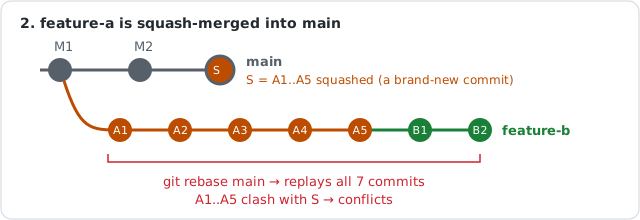
You run git rebase main and… conflicts. Lots of them, in code you never touched.
The reason: feature-a was squash-merged. Its 5 commits were combined into one brand-new commit S on main. Git doesn’t know that S and A1..A5 are “the same work”, they’re different commits. So git rebase main tries to replay all 7 commits on feature-b (A1..A5 plus your B1, B2) on top of S, and A1..A5 collide with their own squashed copy.
And the “nuke it” move loses your work
git reset --hard main makes feature-b exactly main. A1..A5 are fine (they’re in S), but B1 and B2 are gone from the branch, plus any uncommitted changes. Not what you want.
git rebase --onto
What you actually want is: “take only my commits, the ones after A5, and replay them on main.” That’s exactly what --onto does:
git rebase --onto <new-base> <old-base> <branch>

git rebase --onto main A5 feature-b
Read it as: move the commits of feature-b that come after A5 onto main.
<new-base>: where the commits should land (main)<old-base>: the last commit you don’t want to bring along (the tip offeature-a,A5)<branch>: the branch to move (feature-b, optional if you’re already on it)
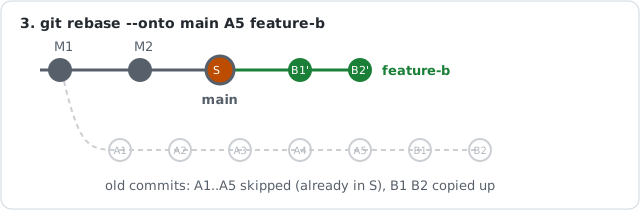
Only B1 and B2 are replayed. If they conflict, it’s a real conflict between your work and what landed on main, which is worth looking at.
Finding <old-base>
If the old feature-a branch still exists locally, just use its name:
git rebase --onto main feature-a feature-b
If it’s already deleted, list the commits on your branch and pick the last one that isn’t yours:
git log --oneline --format='%h %an %s' main..feature-b
Wrap up
git fetch origin
git rebase --onto origin/main <last-commit-of-feature-a> feature-b
git push --force-with-lease
--force-with-lease because the history changed; it refuses to push if someone else pushed to your branch in the meantime, unlike plain --force.
And if anything goes wrong mid-way: git rebase --abort puts everything back as it was. Even after a bad rebase finishes, git reflog still knows where your branch used to be.